 My Book Entry
Tally entry, made simple.
Drop in a bank statement, sales register or bill. My Book Entry builds the vouchers, matches your ledgers, and waits for your approval before anything reaches Tally.
For Windows 10 and 11 · Works with Tally Prime
Pick the saved configuration for this file, drop it in, and the vouchers are built using your Tally ledgers.
File
Configuration
- 01Reads your file
Finds the header row and reads date, narration, withdrawal and deposit from each line.
- 02Applies your configuration
Turns each line into a Payment or Receipt with HDFC Bank on the right side and a voucher number.
- 03Matches ledgers
Your learned rules first, then Tally ledger names and aliases, then close matches to confirm.
- 04Checks every voucher
Dr equals Cr, ledgers exist in Tally, and this file hasn't been uploaded before.
- 05Waits for you
12 built: 9 ready, 3 need a ledger. Nothing is posted until you approve.
3 shown · 1 needs attention · 0 approved
How it works
Set up once. Every month after that, three clicks.
Each bank and each register has its own layout. You teach My Book Entry a layout one time, and it reuses it from then on.
Teach it your file
Open a sample file and answer simple questions: which column is the date, which is the party, which ledgers make up the voucher. A live preview shows the voucher as you go.
Drop next month's file
Pick the saved configuration, such as "HDFC statement" or "GST sales register", and drop in the new file. The vouchers are built in seconds.
Review and post
Fix what needs you, approve the rest, and post to Tally Prime. Post a test batch of 5 first if you want to check them in the Day Book.
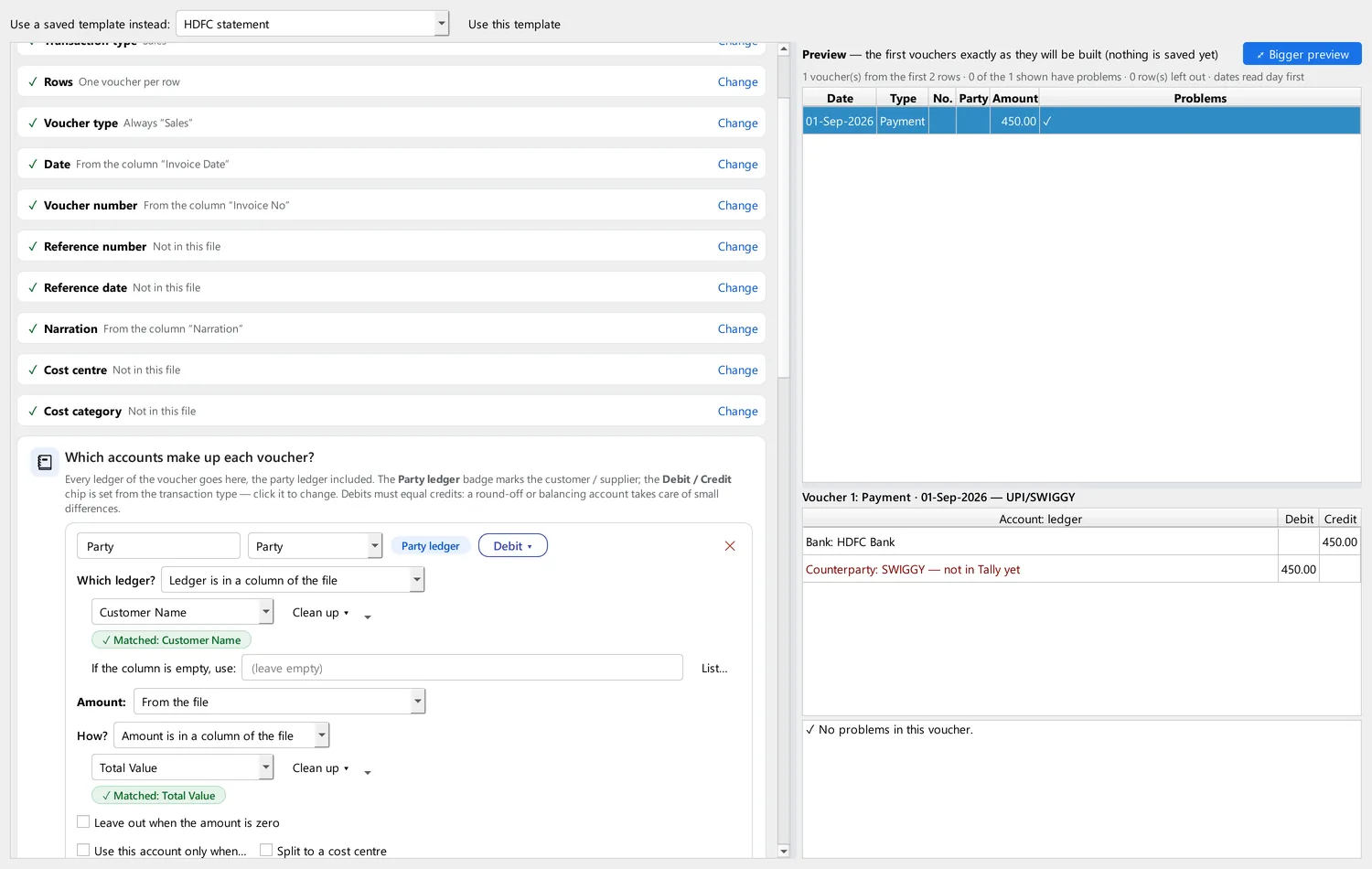
The configuration editor. Each field shows where its value comes from, with a live preview of the voucher on the right.
Learned rules
Choose a ledger once. It remembers.
Tick "Remember this choice" when you pick a ledger, and every matching line is fixed now and next month. The more you use it, the less you fix.
- 1stYour learned rulesChoices you made before, like SWIGGY → Staff Welfare.
- 2ndYour Tally mastersAn exact ledger name or alias.
- 3rdClose matches, as suggestionsShown for you to confirm. It never guesses silently.
| When the text is | Kind | Direction | Use ledger | Used |
|---|---|---|---|---|
| swiggyNEW | Same name | Money out | Staff Welfare | 38 |
| AMAZON PAY | Narration contains | Either | Office Expenses | 12 |
| rao traders | Same name | Money in | Rao Traders | 9 |
| mehta steel | Same name | Money out | Mehta Steel | 7 |
| BANK CHARGES | Narration contains | Money out | Bank Charges | 6 |
Features
Built for how accountants really work.
For CA firms, accountants and businesses that enter the same kinds of files into Tally Prime every month.
Any file you already get
Excel (XLSX, XLS, XLSB), CSV, ODS and PDF, including password-protected files. No reformatting first.
Set up once, reuse monthly
Save a configuration per bank or register. Next month it's choose, drop, done.
Learns your ledgers
Every ledger you pick can become a rule, so the same narration is matched automatically next time.
Review like Tally
One list with Ready, Needs attention and Approved, plus a to-do that tells you exactly what's left.
You approve every post
Checks the right company is open in Tally and masters are current. Post a test batch of 5, or as optional vouchers.
Duplicate checks
Upload the same statement twice by mistake and it tells you before anything is posted twice.
All your companies
Switch between client companies from one sidebar. Each keeps its own configurations and rules.
Roles for your team
Give staff and article assistants access only to the companies they work on.
Voucher numbers handled
Bank, receipt and payment entries get unique voucher numbers automatically.
Before posting
Nothing reaches Tally until you say so.
Approve one by one, or approve every ready voucher at once after a quick look. Then choose how carefully to post.
- See the full Dr / Cr for every voucher before posting
- Ledgers missing in Tally are flagged, never created behind your back
- Post a test batch of 5 and check them in Tally's Day Book
- Or post as optional vouchers that stay out of the books until you accept them
Post approved vouchers to ABC Traders in Tally
- ✓"ABC Traders" is open in Tally
- !Masters last synced 27-Sep-2026 08:00. Consider syncing again.
- ✓12 vouchers approved and ready to send
The bottom line
Less typing. Same control.
- Drop this month's statement
- Vouchers built, ledgers matched.
- Pick a ledger once
- Remembered for next month.
- Not sure about a batch
- Post 5 first and check the Day Book.
- Approve
- Posted to Tally Prime.
Stop typing statements into Tally.
We're opening My Book Entry to a small group of CA firms and accountants first. Tell us about your work and we'll set you up on WhatsApp.
- Windows desktop app for Tally Prime
- We help you set up your first configuration
- Your feedback decides what we build next
FAQ
What accountants ask us
Which version of Tally does it work with?
Tally Prime. Keep Tally open with the company loaded, on the same computer or another one on your office network, and My Book Entry posts to it directly.
Will it work with my bank's statement?
If you can download it as Excel, CSV, ODS or PDF, yes. Every bank lays out its statement differently, so you set up a configuration for it once, and it's reused every month. Password-protected PDFs are fine.
Does it create ledgers in Tally?
No. It uses the ledgers you already have. If a ledger is missing, the voucher is flagged as "Ledger not found" so you can create it in Tally or pick another one before posting.
Can something wrong get posted by mistake?
Only approved vouchers are posted. You can post a test batch of five first, or post as optional vouchers that stay out of the books until you accept them in Tally.
What does it cost?
Pricing will be announced at launch. Early access users will hear about it first.